A meeting planner resource page should hold everything an event team needs to book, promote, and produce your session without emailing you: bios in three lengths, approved high-res headshots, session descriptions, a read-aloud stage introduction, AV requirements, testimonials and video, a named contact, and one download that bundles it all. Planners rebook the speakers who made the event easier to run, and this one page on your speaker website does more of that work than any other.
Keynote speakers spend years on the talk and minutes on the handoff. Then the booking confirmation arrives, and the planner starts asking: a headshot, then the introduction, then the AV rider, then a testimonial for the committee. Each request is small. Together they shape how the planner remembers working with you. This checklist covers what to put on the page, how real speakers set theirs up, and how the page leads to the next booking.
TLDR
- Planners rebook speakers who are easy to work with. A meeting planner resource page answers their requests before they have to ask.
- Include ten items, grouped by the planner's job: vet, promote, produce, and rebook. The checklist and table below list each one.
- The stage introduction and AV requirements cause the most last-minute stress. Write the introduction to be read aloud and post AV needs before the AV order is placed.
- Speaker booking is a committee decision, so the page has to work for people you will never talk to.
- Add a prep call and a post-event debrief to the page. That is where the conversation about next year starts.
Why Does Being Easy to Work With Get a Speaker Rebooked?
Being easy to work with gets a speaker rebooked because planners remember the whole engagement, from contract to load-out, and they share that memory with their peers. A strong keynote earns applause. A smooth engagement earns the next call.
The booking data points the same way. Maria Franzoni, who ran an international speakers bureau for 23 years, describes in a 2026 episode of Speaking With Authority how her research found that just 45 out of 4,500 speakers generated about 80 percent of the bookings. Those speakers shared four qualities: relevant, known, memorable, and easy to work with. Heidi Dening, a keynote speaker who has worked with event planners for 28 years, puts "Please, be easy to work with" at the top of her list of what planners wish speakers knew.
Planners also talk. In a National Speakers Association article, speaker Linda Swindling shared what two meeting professionals told her over lunch, including this warning:
"Meeting professionals talk about speakers they like and who to avoid." A meeting professional quoted in The Real Deal: What Meeting Planners Want Speakers to Know, National Speakers Association
That word of mouth matters because referrals drive the speaking market. In Jay Baer's 2020 survey of meeting planners with Speak Inc., seeing a speaker live and recommendations from bureaus and peers ranked ahead of Google, video, podcasts, and social channels as ways planners find speakers. The planner who found your materials in one place is the same planner a colleague asks for a name next spring. SpeakrBrand founder Conner Krizancic made the point in a short LinkedIn post:
"The best speaker doesn't always get rebooked. The easiest to work with does." Conner Krizancic, founder of SpeakrBrand, on LinkedIn
What Should a Meeting Planner Resource Page Include?

FIG.30A · The meeting planner resource page checklist, ten items grouped by the planner's job. Tap to open full size.
A meeting planner resource page should include ten items: session descriptions, planner testimonials with a short clip, bios in three lengths, approved headshots, promo copy, a stage introduction, AV and stage requirements, a named contact, one download with everything, and a prep call and debrief offer. Group them by the job the planner is doing at that moment, so each person on the event team finds their piece fast.
The list is not invented from the speaker's side. The Meeting Professionals International (MPI) chapter education toolkit includes a speaker checklist that tells planners to obtain audiovisual requirements, handout material, special needs, travel details, a photograph, and a biography from each speaker, and to arrange a presentation introduction. Every one of those requests is something your page can answer before the planner asks.
| Checklist item | Planner job | What to include | Who uses it |
|---|---|---|---|
| 1. Session descriptions | Vet | Title, two-line abstract, three audience outcomes, and the lengths you can deliver | The committee comparing you with other speakers |
| 2. Planner testimonials and a clip | Vet | Two to four quotes from people who booked you, with role and event, plus a short video | The planner who has to defend the choice internally |
| 3. Bios in three lengths | Promote | About 50, 150, and 300 words, in text you can copy | The program, the event app, and the registration page |
| 4. Approved headshots | Promote | High-res files in web and print sizes, portrait and landscape crops | Marketing, signage, and the agenda |
| 5. Promo copy and social posts | Promote | A session blurb and two posts the planner can publish or tag you in | The registration push in the weeks before the event |
| 6. Stage introduction | Produce | A 30 to 60 second script written to be read aloud, with name pronunciation | The emcee, two minutes before you walk on |
| 7. AV and stage requirements | Produce | Mic preference, slides and playback, clicker, video, room set, recording terms | The production team, before the AV order is placed |
| 8. Named contact | Produce | Who answers, how fast, and a day-of phone number | Every question that would otherwise sit in an inbox |
| 9. One download with everything | Rebook | A speaker package PDF or ZIP with every file above, dated and updated each year | The next planner your contact forwards it to |
| 10. Prep call and debrief offer | Rebook | How you learn the audience before the talk and what you report back after | The conversation about next year |
Source: SpeakrBrand speaker website work, 75+ websites developed, checked against the MPI speaker checklist. On a phone, swipe the table sideways to see every column.
A few items deserve extra care. Session descriptions should name outcomes and length options, because sessions keep getting shorter. In Scarlino Speaker Strategies' 2025 conference manager survey, 70% of organizers said their keynote sessions ran 30 minutes or less, up from 66% the year before. A planner who sees a 30-minute version on your page does not have to ask whether you can cut the hour-long talk.
The stage introduction is the most neglected file. An emcee who reads your full bio aloud flattens the first minute of your talk. Toastmasters International advises that introductions should run 30 to 45 seconds and should establish the speaker's expertise on the topic. Write yours to be spoken, add a phonetic spelling of your name, and label it clearly as the introduction.
The speaker package download saves the most time. JJ Birden's meeting planner resources page offers a single ZIP of his bio, technical rider, introduction, and one sheet, plus a separate ZIP with 41 high-resolution photos. David Irvine's planner page offers his bio in both Word and PDF, six labeled photo options, and separate AV and accommodation guides for meeting planners and speaker bureaus, with a named contact and a toll-free number. Each of those choices removes one follow-up email.
What Do Planners Chase Speakers For Most Often?
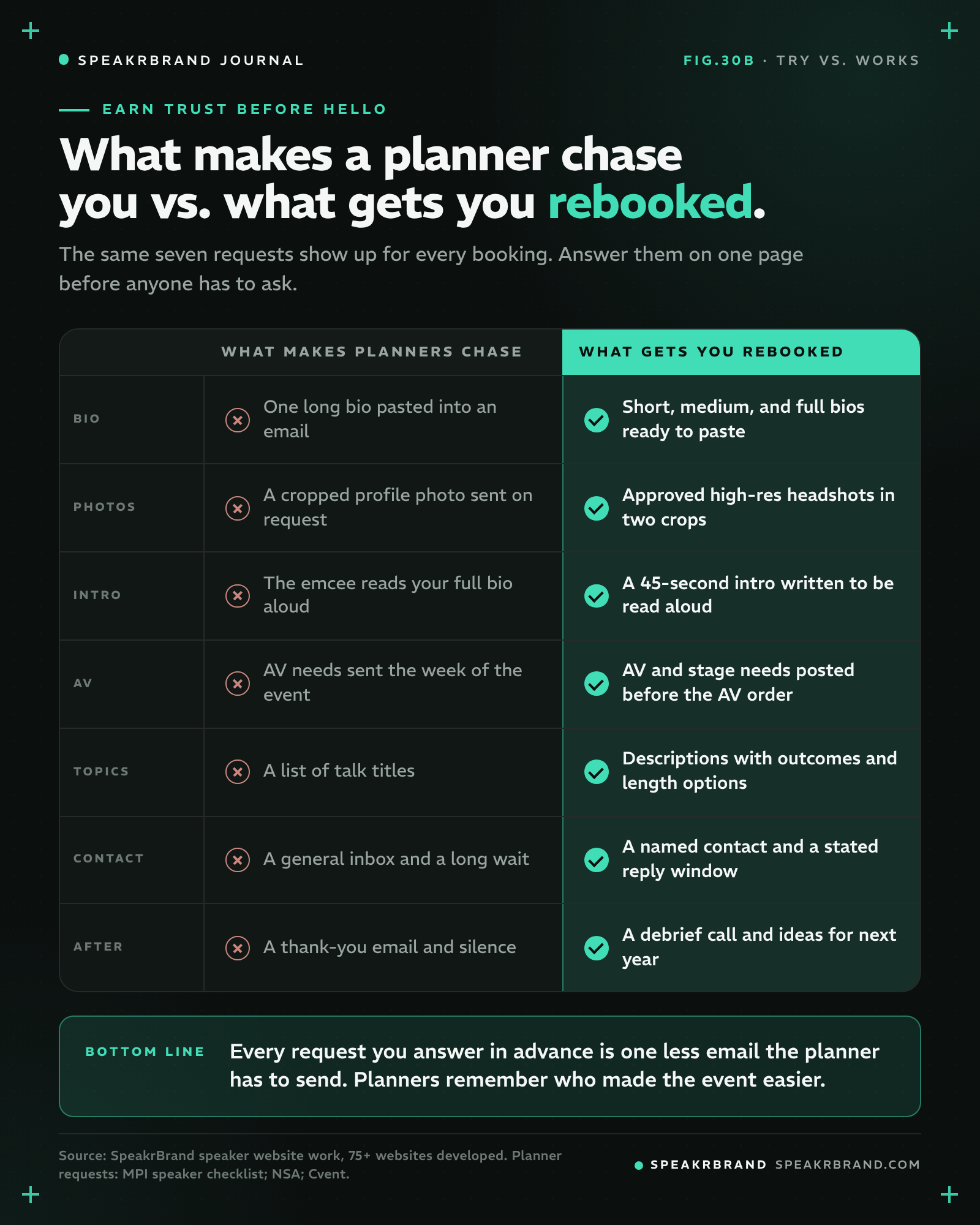
FIG.30B · What makes a planner chase you vs. what gets you rebooked. Tap to open full size.
Planners most often chase speakers for bios, headshots, presentation files, introductions, and AV requirements, usually in separate emails across several weeks. A planner resource page replaces that chain with one link.
The chase is common enough that event software companies sell products to manage it. Cvent's blog describes the time-consuming task of chasing up presentation slides, speaker bios, headshots and other promotional material for an event app and website agenda, and Cvent offers a Speaker Resource Center built to streamline communication with speakers on logistics and content. When a planner has to use software to collect your files, you are one of many names in a portal. When your page already has the files, you are the speaker who saved them a step.
AV is where late answers cost the most. One planner in the NSA article was blunt about it:
"Adding requests later may be expensive or even impossible. Asking after we've ordered all the AV is not going to help set you up for success." A meeting professional, via the National Speakers Association
The Mollie Plotkin Group's speaker AV and production checklist shows what production teams confirm before a keynote: microphone preference, how the presentation plays, who advances the slides, audio and video cues, the stage plot, handouts, and attire. Put your answers to each of those on the page, and add a PDF version the planner can forward to the production company.
Communication gaps show up in the research too. In the 2024 Speaking Industry Benchmark Report from AAE Speakers, as summarized by PCMA, lack of timely communication was the third-biggest complaint planners had about speakers, at 14%, and 19% of organizers said speakers do not understand who is in the audience. A named contact with a stated reply window, plus a short audience intake form, answers both complaints in advance.
How Should You Set Up the Page So a Planner Finds Everything in 30 Seconds?
Set up the page so a planner can find any single file in 30 seconds: one clear URL, labeled download buttons, every file in the format the planner will use, and a single "download everything" option at the top. Speed is the feature. A planner on deadline should never have to scroll through your story to find the AV rider.
Renée Marino's press and planner kit is a clean public example. It opens by promising the materials a planner needs "from first hold to show day, without a back-and-forth," then lists six numbered items: bios in three lengths, headshots and stage photography, a 30-second stage introduction, keynote description and takeaways, AV and technical requirements, and availability with a named team member who replies within one business day. The bios download as plain text, so they paste cleanly into an event app.
Erin Stafford's meeting planner resources page adds the process around the files. It lays out four steps (get in touch, a pre-event content call, the keynote, and a post-event debrief) before listing downloads for her bio, stage introduction, speaker reel, speaking topics, AV requirements, testimonials, and six headshots. A planner sees the files and also sees how the engagement will run.
A few setup rules SpeakrBrand applies across the 75+ websites it has developed for speakers:
- Use a short, memorable URL such as /planners, and link it in the site footer and in every booking confirmation email.
- Name every file with your name and the item, for example "Firstname-Lastname-Stage-Introduction.pdf," so it is easy to find in a crowded downloads folder.
- Offer text files or Word documents for copy and PDFs for forwarding. Planners paste bios; they forward AV riders.
- Date the speaker package and update it every January, so no one prints last year's bio.
Try this first: the 30-second planner test
Send your planner page link to a colleague who has never seen it and start a timer. Ask them to find three things: your stage introduction, your AV requirements, and a high-res headshot they can download. Anything they cannot find in 30 seconds is an email a real planner would have to send you.
How Does a Planner Resource Page Lead to the Next Booking?
A planner resource page leads to the next booking by making the planner look good to their own committee, and by opening the conversation about next year before the event ends. The page keeps working after the talk, every time someone forwards it.
Speaker selection is a group decision. The same AAE benchmark found that fewer than 8 percent of planners make booking decisions alone, and nearly seven out of 10 involve two to five people. Most of those people will never speak with you. They will see your page, your session descriptions, and the testimonials your contact pastes into an internal email. Clear proof on the page helps your champion win that conversation. This is the Proof bucket of Authentic Authority at work: evidence that lets a stranger trust you before hello.
Promotion is part of the ask, too. PCMA's summary of the report lists the extras organizers request, including social media promotion at 48 percent and pre-event publicity at 28 percent. A promo section with a session blurb and two ready-made posts turns that request into a five-minute task for you and a free asset for the planner.
Finally, put the debrief on the page. A post-event call, like the one Erin Stafford lists as her fourth step, gives you a natural moment to ask what the audience needs next and to suggest a follow-up session. Planners decide on next year while this year is still fresh. A speaker who has already asked is the speaker they call first.
The page also shapes the fee you can command. As SpeakrBrand covered in what separates a $5K keynote speaker from a $20K speaker on the same topic, planners judge readiness through the materials around the talk. The planner page belongs inside a high-converting keynote speaker website, and its files come from the same market-ready speaker assets you use everywhere else.
Frequently Asked Questions
What is a meeting planner resource page?
A meeting planner resource page is a page on a speaker's website that holds everything an event team needs to book, promote, and produce a session. It typically includes bios, headshots, session descriptions, a stage introduction, AV requirements, testimonials, and a contact. Some speakers call it a press kit, planner kit, or speaker kit.
Should a meeting planner page be public or password protected?
A meeting planner page should usually be public. Planners, bureau researchers, and committee members need access without asking for a password, and a public page can be found in search. Keep fee schedules and contracts off the page and share those directly.
How long should a speaker's stage introduction be?
A speaker's stage introduction should run about 30 to 60 seconds when read aloud. Toastmasters International recommends 30 to 45 seconds for introductions. Write it to be spoken, include a phonetic spelling of your name, and end with your name as the cue to walk on.
What is the difference between a speaker one sheet and a planner resource page?
A speaker one sheet is a single-page summary used to win the booking. A planner resource page serves the planner after the booking, with every file needed to promote and produce the session. The one sheet belongs on the page as one of the downloads.
How often should a speaker update the planner resource page?
A speaker should update the planner resource page at least once a year and whenever a talk, headshot, or AV need changes. Date the speaker package so planners know the files are current. Old bios and outdated photos are a common reason planners email speakers for replacements.
The talk is what the audience remembers. The handoff is what the planner remembers. Build one page that answers every request before it is asked, and you become the speaker who is easy to bring back. If you want help building it, SpeakrBrand's speaker website development and design team builds planner pages, speaker packages, and the full site around them, so planners trust you before hello.
A meeting planner resource page should hold everything an event team needs to book, promote, and produce your session without emailing you: bios in three lengths, approved high-res headshots, session descriptions, a read-aloud stage introduction, AV requirements, testimonials and video, a named contact, and one download that bundles it all. Planners rebook the speakers who made the event easier to run, and this one page on your speaker website does more of that work than any other.
Keynote speakers spend years on the talk and minutes on the handoff. Then the booking confirmation arrives, and the planner starts asking: a headshot, then the introduction, then the AV rider, then a testimonial for the committee. Each request is small. Together they shape how the planner remembers working with you. This checklist covers what to put on the page, how real speakers set theirs up, and how the page leads to the next booking.
TLDR
- Planners rebook speakers who are easy to work with. A meeting planner resource page answers their requests before they have to ask.
- Include ten items, grouped by the planner's job: vet, promote, produce, and rebook. The checklist and table below list each one.
- The stage introduction and AV requirements cause the most last-minute stress. Write the introduction to be read aloud and post AV needs before the AV order is placed.
- Speaker booking is a committee decision, so the page has to work for people you will never talk to.
- Add a prep call and a post-event debrief to the page. That is where the conversation about next year starts.
Why Does Being Easy to Work With Get a Speaker Rebooked?
Being easy to work with gets a speaker rebooked because planners remember the whole engagement, from contract to load-out, and they share that memory with their peers. A strong keynote earns applause. A smooth engagement earns the next call.
The booking data points the same way. Maria Franzoni, who ran an international speakers bureau for 23 years, describes in a 2026 episode of Speaking With Authority how her research found that just 45 out of 4,500 speakers generated about 80 percent of the bookings. Those speakers shared four qualities: relevant, known, memorable, and easy to work with. Heidi Dening, a keynote speaker who has worked with event planners for 28 years, puts "Please, be easy to work with" at the top of her list of what planners wish speakers knew.
Planners also talk. In a National Speakers Association article, speaker Linda Swindling shared what two meeting professionals told her over lunch, including this warning:
"Meeting professionals talk about speakers they like and who to avoid." A meeting professional quoted in The Real Deal: What Meeting Planners Want Speakers to Know, National Speakers Association
That word of mouth matters because referrals drive the speaking market. In Jay Baer's 2020 survey of meeting planners with Speak Inc., seeing a speaker live and recommendations from bureaus and peers ranked ahead of Google, video, podcasts, and social channels as ways planners find speakers. The planner who found your materials in one place is the same planner a colleague asks for a name next spring. SpeakrBrand founder Conner Krizancic made the point in a short LinkedIn post:
"The best speaker doesn't always get rebooked. The easiest to work with does." Conner Krizancic, founder of SpeakrBrand, on LinkedIn
What Should a Meeting Planner Resource Page Include?
FIG.30A · The meeting planner resource page checklist, ten items grouped by the planner's job. Tap to open full size.
A meeting planner resource page should include ten items: session descriptions, planner testimonials with a short clip, bios in three lengths, approved headshots, promo copy, a stage introduction, AV and stage requirements, a named contact, one download with everything, and a prep call and debrief offer. Group them by the job the planner is doing at that moment, so each person on the event team finds their piece fast.
The list is not invented from the speaker's side. The Meeting Professionals International (MPI) chapter education toolkit includes a speaker checklist that tells planners to obtain audiovisual requirements, handout material, special needs, travel details, a photograph, and a biography from each speaker, and to arrange a presentation introduction. Every one of those requests is something your page can answer before the planner asks.
| Checklist item | Planner job | What to include | Who uses it |
|---|---|---|---|
| 1. Session descriptions | Vet | Title, two-line abstract, three audience outcomes, and the lengths you can deliver | The committee comparing you with other speakers |
| 2. Planner testimonials and a clip | Vet | Two to four quotes from people who booked you, with role and event, plus a short video | The planner who has to defend the choice internally |
| 3. Bios in three lengths | Promote | About 50, 150, and 300 words, in text you can copy | The program, the event app, and the registration page |
| 4. Approved headshots | Promote | High-res files in web and print sizes, portrait and landscape crops | Marketing, signage, and the agenda |
| 5. Promo copy and social posts | Promote | A session blurb and two posts the planner can publish or tag you in | The registration push in the weeks before the event |
| 6. Stage introduction | Produce | A 30 to 60 second script written to be read aloud, with name pronunciation | The emcee, two minutes before you walk on |
| 7. AV and stage requirements | Produce | Mic preference, slides and playback, clicker, video, room set, recording terms | The production team, before the AV order is placed |
| 8. Named contact | Produce | Who answers, how fast, and a day-of phone number | Every question that would otherwise sit in an inbox |
| 9. One download with everything | Rebook | A speaker package PDF or ZIP with every file above, dated and updated each year | The next planner your contact forwards it to |
| 10. Prep call and debrief offer | Rebook | How you learn the audience before the talk and what you report back after | The conversation about next year |
Source: SpeakrBrand speaker website work, 75+ websites developed, checked against the MPI speaker checklist. On a phone, swipe the table sideways to see every column.
A few items deserve extra care. Session descriptions should name outcomes and length options, because sessions keep getting shorter. In Scarlino Speaker Strategies' 2025 conference manager survey, 70% of organizers said their keynote sessions ran 30 minutes or less, up from 66% the year before. A planner who sees a 30-minute version on your page does not have to ask whether you can cut the hour-long talk.
The stage introduction is the most neglected file. An emcee who reads your full bio aloud flattens the first minute of your talk. Toastmasters International advises that introductions should run 30 to 45 seconds and should establish the speaker's expertise on the topic. Write yours to be spoken, add a phonetic spelling of your name, and label it clearly as the introduction.
The speaker package download saves the most time. JJ Birden's meeting planner resources page offers a single ZIP of his bio, technical rider, introduction, and one sheet, plus a separate ZIP with 41 high-resolution photos. David Irvine's planner page offers his bio in both Word and PDF, six labeled photo options, and separate AV and accommodation guides for meeting planners and speaker bureaus, with a named contact and a toll-free number. Each of those choices removes one follow-up email.
What Do Planners Chase Speakers For Most Often?
FIG.30B · What makes a planner chase you vs. what gets you rebooked. Tap to open full size.
Planners most often chase speakers for bios, headshots, presentation files, introductions, and AV requirements, usually in separate emails across several weeks. A planner resource page replaces that chain with one link.
The chase is common enough that event software companies sell products to manage it. Cvent's blog describes the time-consuming task of chasing up presentation slides, speaker bios, headshots and other promotional material for an event app and website agenda, and Cvent offers a Speaker Resource Center built to streamline communication with speakers on logistics and content. When a planner has to use software to collect your files, you are one of many names in a portal. When your page already has the files, you are the speaker who saved them a step.
AV is where late answers cost the most. One planner in the NSA article was blunt about it:
"Adding requests later may be expensive or even impossible. Asking after we've ordered all the AV is not going to help set you up for success." A meeting professional, via the National Speakers Association
The Mollie Plotkin Group's speaker AV and production checklist shows what production teams confirm before a keynote: microphone preference, how the presentation plays, who advances the slides, audio and video cues, the stage plot, handouts, and attire. Put your answers to each of those on the page, and add a PDF version the planner can forward to the production company.
Communication gaps show up in the research too. In the 2024 Speaking Industry Benchmark Report from AAE Speakers, as summarized by PCMA, lack of timely communication was the third-biggest complaint planners had about speakers, at 14%, and 19% of organizers said speakers do not understand who is in the audience. A named contact with a stated reply window, plus a short audience intake form, answers both complaints in advance.
How Should You Set Up the Page So a Planner Finds Everything in 30 Seconds?
Set up the page so a planner can find any single file in 30 seconds: one clear URL, labeled download buttons, every file in the format the planner will use, and a single "download everything" option at the top. Speed is the feature. A planner on deadline should never have to scroll through your story to find the AV rider.
Renée Marino's press and planner kit is a clean public example. It opens by promising the materials a planner needs "from first hold to show day, without a back-and-forth," then lists six numbered items: bios in three lengths, headshots and stage photography, a 30-second stage introduction, keynote description and takeaways, AV and technical requirements, and availability with a named team member who replies within one business day. The bios download as plain text, so they paste cleanly into an event app.
Erin Stafford's meeting planner resources page adds the process around the files. It lays out four steps (get in touch, a pre-event content call, the keynote, and a post-event debrief) before listing downloads for her bio, stage introduction, speaker reel, speaking topics, AV requirements, testimonials, and six headshots. A planner sees the files and also sees how the engagement will run.
A few setup rules SpeakrBrand applies across the 75+ websites it has developed for speakers:
- Use a short, memorable URL such as /planners, and link it in the site footer and in every booking confirmation email.
- Name every file with your name and the item, for example "Firstname-Lastname-Stage-Introduction.pdf," so it is easy to find in a crowded downloads folder.
- Offer text files or Word documents for copy and PDFs for forwarding. Planners paste bios; they forward AV riders.
- Date the speaker package and update it every January, so no one prints last year's bio.
Try this first: the 30-second planner test
Send your planner page link to a colleague who has never seen it and start a timer. Ask them to find three things: your stage introduction, your AV requirements, and a high-res headshot they can download. Anything they cannot find in 30 seconds is an email a real planner would have to send you.
How Does a Planner Resource Page Lead to the Next Booking?
A planner resource page leads to the next booking by making the planner look good to their own committee, and by opening the conversation about next year before the event ends. The page keeps working after the talk, every time someone forwards it.
Speaker selection is a group decision. The same AAE benchmark found that fewer than 8 percent of planners make booking decisions alone, and nearly seven out of 10 involve two to five people. Most of those people will never speak with you. They will see your page, your session descriptions, and the testimonials your contact pastes into an internal email. Clear proof on the page helps your champion win that conversation. This is the Proof bucket of Authentic Authority at work: evidence that lets a stranger trust you before hello.
Promotion is part of the ask, too. PCMA's summary of the report lists the extras organizers request, including social media promotion at 48 percent and pre-event publicity at 28 percent. A promo section with a session blurb and two ready-made posts turns that request into a five-minute task for you and a free asset for the planner.
Finally, put the debrief on the page. A post-event call, like the one Erin Stafford lists as her fourth step, gives you a natural moment to ask what the audience needs next and to suggest a follow-up session. Planners decide on next year while this year is still fresh. A speaker who has already asked is the speaker they call first.
The page also shapes the fee you can command. As SpeakrBrand covered in what separates a $5K keynote speaker from a $20K speaker on the same topic, planners judge readiness through the materials around the talk. The planner page belongs inside a high-converting keynote speaker website, and its files come from the same market-ready speaker assets you use everywhere else.
Frequently Asked Questions
What is a meeting planner resource page?
A meeting planner resource page is a page on a speaker's website that holds everything an event team needs to book, promote, and produce a session. It typically includes bios, headshots, session descriptions, a stage introduction, AV requirements, testimonials, and a contact. Some speakers call it a press kit, planner kit, or speaker kit.
Should a meeting planner page be public or password protected?
A meeting planner page should usually be public. Planners, bureau researchers, and committee members need access without asking for a password, and a public page can be found in search. Keep fee schedules and contracts off the page and share those directly.
How long should a speaker's stage introduction be?
A speaker's stage introduction should run about 30 to 60 seconds when read aloud. Toastmasters International recommends 30 to 45 seconds for introductions. Write it to be spoken, include a phonetic spelling of your name, and end with your name as the cue to walk on.
What is the difference between a speaker one sheet and a planner resource page?
A speaker one sheet is a single-page summary used to win the booking. A planner resource page serves the planner after the booking, with every file needed to promote and produce the session. The one sheet belongs on the page as one of the downloads.
How often should a speaker update the planner resource page?
A speaker should update the planner resource page at least once a year and whenever a talk, headshot, or AV need changes. Date the speaker package so planners know the files are current. Old bios and outdated photos are a common reason planners email speakers for replacements.
The talk is what the audience remembers. The handoff is what the planner remembers. Build one page that answers every request before it is asked, and you become the speaker who is easy to bring back. If you want help building it, SpeakrBrand's speaker website development and design team builds planner pages, speaker packages, and the full site around them, so planners trust you before hello.